
Does Advertised Salary Include Super in Australia?
By the Orry team · Published

Does the advertised salary include super in Australia?
Sometimes yes, sometimes no — and the job ad will not always tell you. In Australia, superannuation is a compulsory employer contribution, and the super guarantee rate has been 12% since 1 July 2025, and from 1 July 2026 (Payday Super) it is calculated on qualifying earnings: ordinary time earnings plus commissions, but not overtime. What varies is whether the employer has quoted you the base salary with super paid on top, or a single package figure that already has the super baked into it.
The wording is your only clue, and it is usually one of three patterns. "$95,000 + super" means the base is $95,000 and the employer pays super on top. "$95,000 package", "$95,000 inclusive of super" or "$95,000 TRP" means the headline number is the total, and your base sits below it. "$95,000" on its own, with no qualifier, is genuinely ambiguous — most Australian employers mean base salary, but you cannot assume it.
That ambiguity matters more than it looks. At a 12% super rate, the gap between the two readings of the same headline number is roughly 10.7% of the total package (12 ÷ 112), every year, compounding through every future pay rise you negotiate off that base.
"Plus super" vs "including super": what's the difference in dollars?
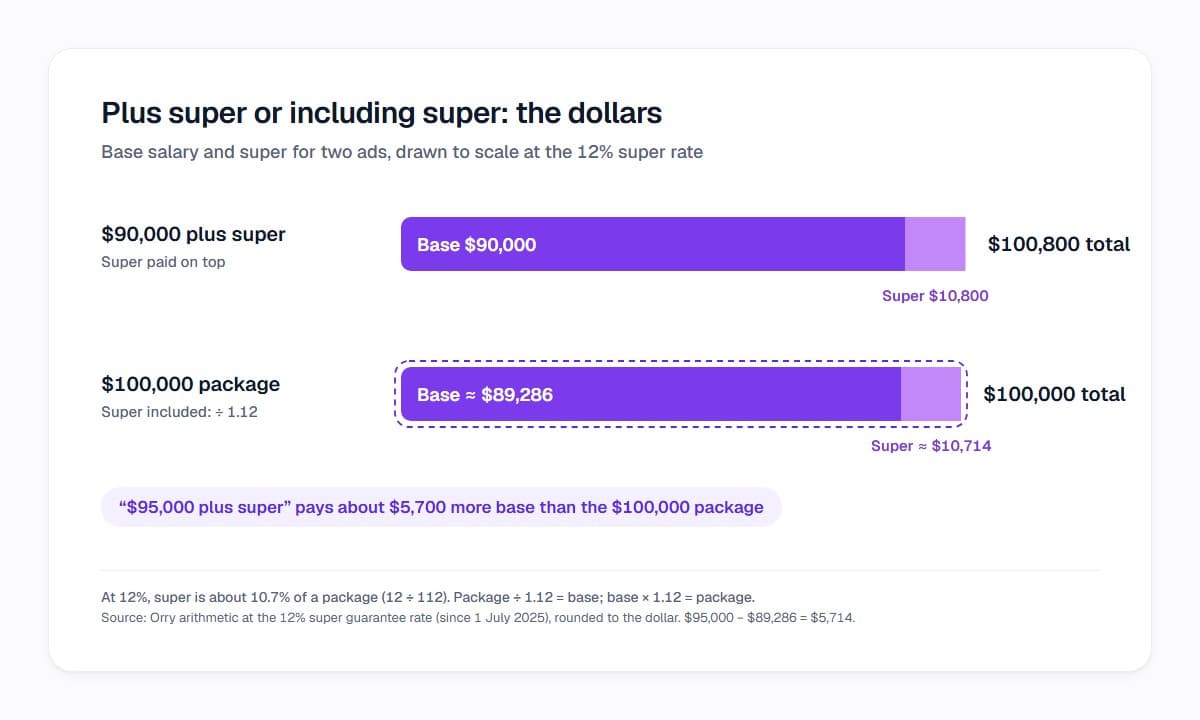
Run the arithmetic once and you will never misread an ad again. At the 12% rate:
A role advertised at $90,000 plus super pays $90,000 in base salary, with $10,800 going to your fund. The total cost to the employer is $100,800.
A role advertised at $100,000 including super works backwards instead. Divide the package by 1.12 and the base is about $89,286, with roughly $10,714 going to super.
So "$100,000 package" and "$90,000 plus super" are almost the same offer, despite the headline numbers differing by ten thousand dollars. Compare "$100,000 package" against "$95,000 plus super" and the second role pays about $5,700 more in base salary — the number that drives your tax, your borrowing capacity and your next pay review.
- To convert a package to base salary: divide the package by 1.12
- To convert a base salary to a package: multiply the base by 1.12
- Since 1 July 2026, super is calculated on qualifying earnings, which exclude overtime, so overtime paid at overtime rates generally does not attract super
- Bonuses, commissions and allowances may or may not count — it depends on the payment, so ask rather than assume
Why does the SEEK salary filter show different numbers to the ad?
Two things confuse people on SEEK. First, employers must select a salary range when they post a role, but they do not have to display it in the ad text itself. That is why you will see roles with no visible pay that still appear when you apply a salary filter — the range exists behind the scenes even when the ad says "competitive salary".
Second, SEEK's own guidance on the minimum salary setting in your profile describes it as the base salary amount, which excludes bonuses and super. If you have been typing your target package into that field, you have effectively been filtering at a higher base than you meant to, and quietly cutting roles out of your results.
The practical fix is to pick one basis — base salary — and use it everywhere: in your SEEK filter, in your expected salary answers, and in the mental comparison you run on every ad. Then convert any package figure you encounter down to base before you judge it.
What do "package", "TRP" and "OTE" mean in a job ad?
Australian job ads use a small cluster of remuneration terms, and they are not interchangeable.
Package or TRP (total remuneration package) is the overall annual value of what the employer pays for your work. It usually includes employer super contributions and may also fold in other benefits, such as a car allowance or a phone. Different employers define it differently, which is exactly why the word on its own is not enough.
Base salary is the cash figure for your ordinary work, before super, bonuses, overtime or allowances. It is the cleanest number for comparing offers.
OTE (ordinary time earnings) is the main part of the base that super is calculated on. Since 1 July 2026 that base is qualifying earnings, which add commissions and some salary-sacrificed amounts to OTE. Work performed outside your ordinary hours and paid as overtime is generally not OTE, which is why a shift role with heavy overtime can have a large gross income but a smaller super contribution than you would expect.
OTE also explains a common frustration in sales roles. If an ad quotes "$70,000 + super + OTE $120,000", that second figure is on-target earnings — a commission scenario, not a guaranteed salary. Only the $70,000 is contractual.
How do I compare two ads on the same basis?
Before you spend an evening on an application, it takes about thirty seconds to normalise the numbers. Write both roles down as base salary, then note what sits on top.
If the ad gives you no number at all, you are not stuck — SEEK publishes salary insights by role and you can ask the recruiter directly for the band the role was approved at. Asking is normal and does not count against you.
- Convert any package or TRP figure to base by dividing by 1.12
- Strip out anything variable: bonus, commission, OTE, overtime
- Note non-cash items separately — car allowance, salary packaging, extra leave, study budget
- Check whether the role is salary packaged through a not-for-profit or hospital employer, which changes your after-tax position
- Ask the recruiter one question: "Is that figure base or inclusive of super?"
How do I set a salary floor that actually filters my search?
Most application fatigue starts with a mismatch you could have seen in the first ten seconds. You read an ad, like the title, skim past "$105,000 package", apply, and only discover at the offer stage that the base was below your floor all along.
A salary floor only works if it is written in one consistent unit and applied to every ad you open. That is the idea behind Career DNA — you set your priorities once, including what you need to earn, and Orry scores the jobs you browse on SEEK and LinkedIn Jobs against that profile rather than against a generic benchmark.
Each role gets an Orry Score from 0 to 100 with a clear band and the reasons behind it, so when pay is the thing dragging a role down, you can see that it is pay and not guess. The score is about fit with what you said matters to you — it is not a prediction of whether you will be hired, and it will never tell you what to do with an ad. That decision stays yours.
Over a few weeks of browsing, the pattern is usually more useful than any single score: you start noticing which employers quote packages, which quote base, and which industries in your search consistently sit under your floor.
Orry is free to start, and it works inside the SEEK and LinkedIn Jobs pages you are already scrolling. Set your Career DNA once, then see the reasons behind every score as you browse.
See which jobs fit you before you open them.
Orry scores the jobs you browse on SEEK and LinkedIn Jobs against what matters to you, with the reasons.
Free to install · No credit card · Works on the sites you already use
Sources
- Explaining qualifying earnings (super guarantee 12% from 1 July 2025; Payday Super from 1 July 2026) — Australian Taxation Office
- SGR 2009/2: meaning of 'ordinary time earnings' and 'salary or wages' — ATO ruling
- What Minimum Salary requirement should I select for my SEEK profile? — SEEK Help
- How can I find the salary for a particular role, if it isn't mentioned in the job ad? — SEEK Help
- Salary including super calculator and conversion table — Microkeeper
- What Does Total Remuneration Mean in Australia? — Sprintlaw
Researched with AI assistance and checked by a person before publishing: editorial policy.