
Why Do Job Ads Not Show Salary in Australia? What To Do
By the Orry team · Published
Why do so many Australian job ads leave the salary out?
If you have spent an evening scrolling SEEK and noticed that half the ads tell you nothing about pay, you are not imagining it. SBS News, reporting on SEEK's own findings, said most Australian job ads do not disclose salary, and ABC's Hack has covered the same trend of ads leaving pay off the page.
The reasons are usually mundane rather than sinister. Hiring managers are working to an internal band they would rather not publish, or the ad covers two seniority levels and the final number depends on who turns up. Sometimes the budget is not signed off. Sometimes the employer does not want existing staff comparing the ad to their own payslip. Recruitment agencies often advertise a role on behalf of a client who has asked them not to publish the figure, and some agencies run ads to build a candidate pool for similar roles.
Interestingly, SEEK's own advice to employers encourages them to include salary in ads, so the pressure is moving in the direction of more disclosure, not less. That does not help you tonight, though. What helps tonight is knowing how to read what is actually written, and how to get a number out of the process early.
- The band is wide and the employer wants room to move once they meet candidates
- The ad covers more than one level, so there is no single number to publish
- It is an agency ad and the client has asked for the figure to stay private
- The employer does not want current staff benchmarking themselves against the ad
- The role is new and the budget has not been finalised
- The pay is set by a classification or enterprise agreement, so the ad names a level instead of a dollar figure
What do phrases like 'competitive salary' and 'commensurate with experience' actually mean?
Australian ads have a small dictionary of pay phrases that look informative and mostly are not. Here is how to read them, and what to check before you spend time on the application.
Two of these matter more than people expect. The super question can move a package by thousands, and 'pro rata' is the single most misread phrase on part-time ads.
- 'Competitive salary' or 'attractive remuneration package' — treat this as no information at all. It tells you the employer thinks the number is reasonable, not what it is.
- 'Salary commensurate with experience' or 'DOE' — a range exists internally and the employer intends to place you in it after the interview. Ask for the top and bottom of the band.
- '$95,000 + super' versus 'package' or 'total remuneration' — one quotes base pay with superannuation on top, the other may fold super (and sometimes a car allowance or bonus) into the headline. Always ask which one you are looking at.
- 'OTE' (on-target earnings) — a base plus commission assuming you hit targets. Ask what the base alone is, and what proportion of the team hit target last year.
- 'Pro rata' on a part-time ad — the figure quoted is the full-time equivalent. Your actual pay is scaled to your days.
- 'Hourly rate, casual' — casual rates usually include a loading in place of leave entitlements, so comparing a casual hourly rate directly against a permanent one overstates the gap. The Fair Work Ombudsman's pay tools are the place to check the minimum for your award.
- Classification codes like 'APS 6', 'HEO 7', 'Level 5' or 'Grade 3' — these are not vague at all. The dollar figures are published in the agency's or institution's enterprise agreement, which is usually a quick search away.
How can you work out the likely pay range before you talk to anyone?
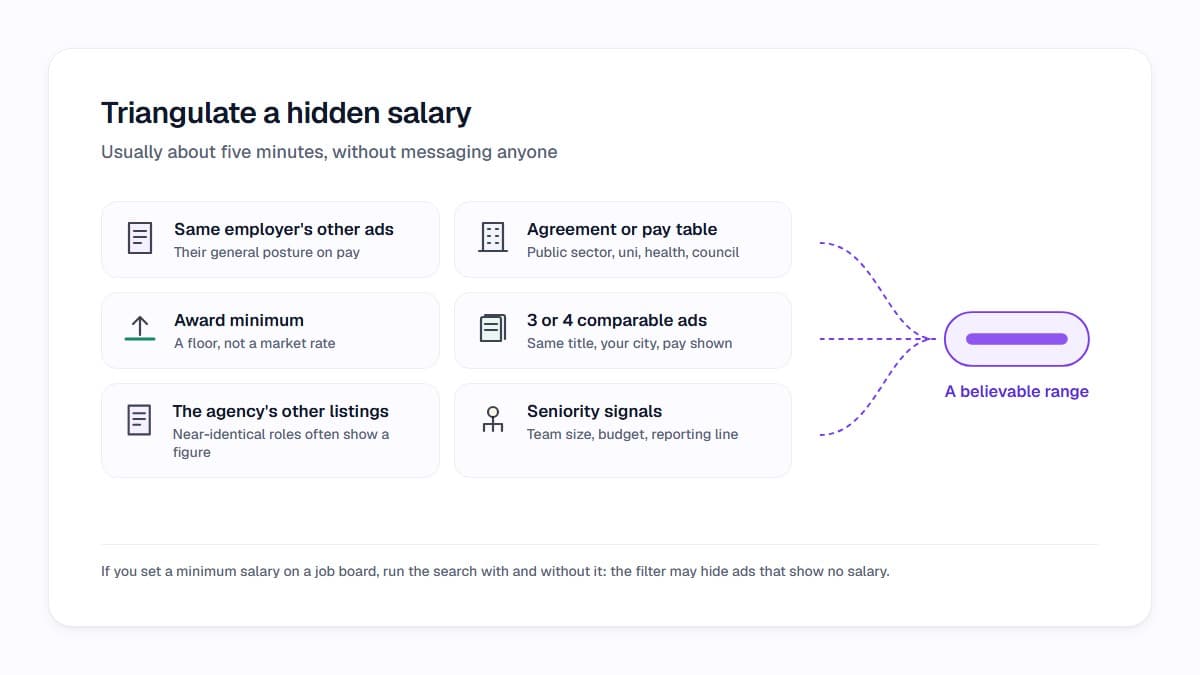
You can usually narrow a mystery salary to a believable range in about five minutes, without messaging anyone. The trick is to triangulate rather than rely on one source.
A word of warning on salary filters: if you set a minimum salary on a job board, check whether that filter is also hiding ads that simply have no salary attached. Running the same search with and without the filter will tell you quickly, and it is worth knowing which way your search behaves before you conclude there are no jobs out there.
- Look at the same employer's other current ads. Many organisations publish pay on some roles and not others, which gives you their general posture.
- For public sector, university, health and local council roles, find the enterprise agreement or classification pay table. The numbers are public.
- Check the relevant award minimum through the Fair Work Ombudsman if the role sits at award level — that gives you a floor, not a market rate.
- Search the exact job title plus your city and read ads from competitors who do publish. Three or four comparable ads make a usable range.
- If an agency is advertising, look at their other listings. Agencies often run near-identical roles where one of them shows a figure.
- Note the seniority signals in the ad itself — team size, budget responsibility, reporting line. A role reporting to a GM sits in a different band to one reporting to a team leader.
Is a missing salary a red flag on its own?
Usually not. Given how common the practice is in Australia, treating every ad without a number as suspicious would rule out most of the market. The signal is weak by itself and only becomes meaningful when it travels with other things.
What is worth noticing is the combination. An ad with no salary, no named employer, a duty list that spans two very different jobs, and language about being 'like a family' or wanting a 'rockstar' who can 'wear many hats' is telling you the role is undefined. Undefined roles are where pay conversations go sideways, because nobody has agreed what the job is worth.
Also watch for the ad that asks for your salary expectations in the first screening question while telling you nothing about the range. You are allowed to answer with a range and a question back. And if an ad has been reposted for months with no change, that often means the budget and the expectations have not met yet — useful context for your own conversation.
Separately, be alert to recruitment scams: unsolicited offers, interviews conducted entirely over messaging apps, or any request for payment or bank details before an employment contract exists have nothing to do with normal ads that simply omit pay.
How do you ask about pay without it getting awkward?
The earlier the question lands, the less awkward it is. Asking at the first contact is normal and most recruiters expect it — they are also trying to avoid wasting a week on a candidate who is outside the band.
A simple opener works: 'Before we go further, could you tell me the band for this role, and whether that figure includes superannuation?' If they push the question back to you, give a range with a reason attached: 'Based on comparable roles in Brisbane and the scope described in the ad, I'm looking at the low to mid nineties plus super. Does that sit inside your range?'
Two follow-ups are worth having ready. First, 'Where in the band would someone with my background typically start?' — bands are wide and the answer tells you whether the top number is realistic. Second, 'What else sits in the package?' — leave loading, salary packaging in the not-for-profit and health sectors, bonuses, allowances and genuine flexibility all change the comparison between two offers that look similar on base pay.
If you are negotiating, do it against evidence you can point to rather than against what you currently earn. Comparable published ads, award or enterprise agreement levels, and the specific scope of this role are all fair ground.
How do you stop re-reading ads that can't meet your floor?
The real cost of hidden salaries is not any single ad. It is the slow drain of opening forty listings a week, reconstructing the same guesswork each time, and losing track of which ones actually matched what you need. By Thursday everything blurs together.
Decide your floor once, in writing, before you start browsing: the minimum base you will discuss, whether that is inclusive of super, the maximum commute or office days you will accept, and the two or three things that genuinely matter more than money. That document is the filter. Everything else is just reading.
This is the part Orry automates. You set your priorities once in Career DNA — pay floor, location and commute, work type, the things you want more of — and then as you browse SEEK or LinkedIn Jobs, every listing picks up an Orry Score out of 100 with the reasons behind it, so you can see at a glance which ads line up with the floor you set and which ones you are only reading out of habit. The score is about fit against your own priorities, with the reasoning shown; it is not a prediction about being hired, and it does not make the decision for you.
You can try Orry free and see how your own shortlist looks when every ad is scored against what you actually asked for.
See which jobs fit you before you open them.
Orry scores the jobs you browse on SEEK and LinkedIn Jobs against what matters to you, with the reasons.
Free to install · No credit card · Works on the sites you already use
Sources
- Australian job ads mostly not disclosing salaries, SEEK finds
- More and more job ads don't list salaries: When and how to bring up pay — triple j Hack
- Why it's important to include salary in your job ads — SEEK employer hiring advice
- How to spot and stop an employment scam
Researched with AI assistance and checked by a person before publishing: editorial policy.