
What Does Private Advertiser Mean on SEEK Job Ads?
By the Orry team · Published
What does "Private Advertiser" mean on a SEEK job ad?
Scroll SEEK for ten minutes and you'll hit one: a job that looks detailed and specific, with a salary band and a suburb, but where the company name should be it just says "Private Advertiser". No logo. No reviews. No careers page to click through to.
It isn't a glitch or a special category of job. It's a setting. When an advertiser builds a job ad in SEEK's Ad Centre there's an "Advertise privately" option that hides the company name, reviews and branding, and the ad then displays as a private advertiser.
Everything else about the ad works normally. The description, the classification, the location, the work type and the salary field (if the advertiser chose to show one) are exactly the same as any branded ad. The only thing missing is the identity of the business.
It also doesn't tell you whether you're dealing with the employer directly or an agency. Recruitment agencies sometimes advertise privately on behalf of a client, which is why so many private ads use phrases like "our client" or "a well-established business in Melbourne's south-east".
Why would an employer hide its name?
The ad won't tell you which reason applies, but there are a handful of ordinary explanations that come up again and again when you read enough of these listings:
- They're replacing someone who is still in the job and doesn't know it yet.
- A restructure, merger or new site is in progress and the business doesn't want staff, customers or competitors reading about it on a job board.
- It's a small business whose owner doesn't want a week of phone calls from candidates, suppliers and competitors.
- It's a recognisable brand that expects a very large volume of applications if the name is attached.
- An agency has been asked not to name the client, often because several agencies are working the same role.
- The advertised pay band would be visible to current employees doing similar work.
Is a Private Advertiser job ad a scam?
Usually not. Hiding the brand is a standard feature that any paying advertiser can switch on, and SEEK says its online security team regularly screens the site for suspicious job ads and advertisers and removes them.
That said, job scams in Australia are real and they do target job seekers. Scamwatch reported that Australians lost over $8.7 million to recruitment scams in 2022, and the National Anti-Scam Centre has since issued further alerts about employment scams, including criminals impersonating well-known companies and recruiters. SEEK also runs a Job Seeker Security Hub warning about scammers impersonating SEEK through SMS and messaging apps such as WhatsApp.
So the sensible approach isn't to treat every unnamed ad as suspicious. It's to look at the things that actually separate a cautious employer from a scam:
- Pay that's wildly above the going rate for the experience being asked for, especially for "flexible, task-based, work from home" roles.
- Any request for money, fees, deposits, equipment purchases or cryptocurrency at any stage.
- Pressure to move the conversation to WhatsApp, Telegram or a personal email address early on.
- Requests for your driver's licence, passport, tax file number or bank details before you've spoken to a real person about a real offer.
- A description full of generic duties with nothing specific to an industry, a system or a location.
- Nothing verifiable anywhere: no ABN, no consultant name, no phone number, no reference number.
How do you work out who the employer actually is?
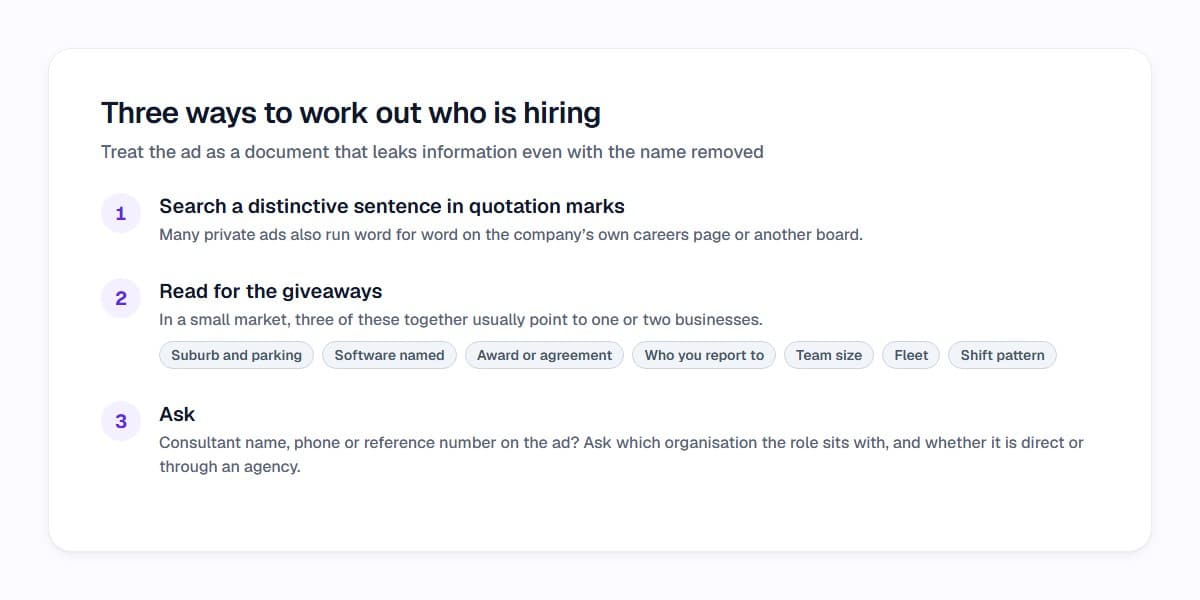
You can often narrow it down in a couple of minutes without contacting anyone. The trick is to treat the ad as a document that leaks information even when the name is removed.
Copy a distinctive sentence from the description, put it in quotation marks and search it. Many private ads are also published on the company's own careers page or another board with the brand attached, word for word. If the text is unique to SEEK, that tells you something too.
Then read for the giveaways. The suburb and the mention of parking, the software named in the requirements, an enterprise agreement or award, the title of the person you'd report to, the size of the team, the fleet, the shift pattern. In a small market, three of those together usually point to one or two businesses.
Finally, just ask. If there's a consultant name, phone number or reference number on the ad, a short email asking which organisation the role sits with, and whether it's a direct or agency placement, is a completely normal question. Plenty of advertisers will answer before an interview even if they wouldn't put it in the ad.
How do you judge a private ad when you can't research the company?
When the employer brand is hidden, all the usual shortcuts disappear. You can't skim reviews, you can't look at who works there, and you can't get a feel for the place from its website. What's left is the ad itself, which is actually where most of the useful information was all along.
Read it the way an assessor would. Which requirements are non-negotiable and which are wish-list items? Is the pay stated, and does it sit above or below your floor? Is the location realistic for your commute on the days you'd be on site? Is it permanent, fixed term or casual, and does the ad say so clearly?
That's slow work when you're getting through thirty ads an evening, which is where a tool helps. Job X-Ray reads the job's requirements and checks each one against the evidence you confirmed from your CV, highlighting each requirement inside the description, so you can see at a glance which parts of an unnamed ad you can actually evidence and which you can't. And because Orry works on SEEK while you browse, the reasons sit beside the ad rather than in a separate spreadsheet.
None of that reveals who the advertiser is. It just means the decision about what to do with the ad is based on the content in front of you instead of a blank company field.
What should you share, and when?
Applying through SEEK's normal apply flow sends what you'd expect: your CV, your contact details, and any cover letter or screening answers. That's ordinary, private advertiser or not.
What's worth slowing down for is anything beyond that. Identity documents, tax file numbers, bank details and copies of your passport or licence belong to the onboarding stage of a real job, not to an application form or a first chat on a messaging app. SEEK's security advice includes checking that sender email addresses genuinely belong to the organisation they claim to represent.
If an ad or a follow-up message feels wrong, you can report it to SEEK and to Scamwatch. Scamwatch also points people who have handed over identifying information to IDCARE on 1800 595 160.
And if you've applied to a private ad and heard nothing, that's not evidence of anything either. Unnamed ads attract the same silence as named ones.
The short version
"Private Advertiser" on SEEK means one checkbox was ticked when the ad was created. It hides the company name, reviews and branding, and nothing else. Some of those ads come from businesses with a perfectly dull reason for staying quiet, some come from agencies protecting a client, and a small number are worth a harder look using the warning signs above.
Either way, the ad still has to tell you what the work is, what it pays and what it requires. If it doesn't, that's a far better reason to be cautious than the missing logo.
If you'd like the fit part handled while you browse, Orry gives every SEEK and LinkedIn job you open an Orry Score out of 100 with the reasons behind it, based on the priorities you set. It's a measure of fit against what you said matters, not a prediction about being hired. Try it free and see how the unnamed ads in your search stack up.
See which jobs fit you before you open them.
Orry scores the jobs you browse on SEEK and LinkedIn Jobs against what matters to you, with the reasons.
Free to install · No credit card · Works on the sites you already use
Sources
- Can I hide my business name? – SEEK Employer Help
- 8 ways to spot a job scam – SEEK Career Advice
- Job Seeker Security Hub – SEEK
- New year, new job? Beware of scammers – Scamwatch
- Scam alert: job scams on the rise – Scamwatch
- Scam alert: Job recruitment scams – Scamwatch
Researched with AI assistance and checked by a person before publishing: editorial policy.