
Essential and Desirable Criteria in Job Ads (Australia)
By the Orry team · Published

What do "essential" and "desirable" actually mean in an Australian job ad?
Scroll far enough down most Australian job ads and you hit a list. Sometimes it is labelled clearly as selection criteria. Sometimes it sits under a friendlier heading like "What you'll bring" or "About you". Either way, it is the list the employer will use to sort applications, and it is usually split into two tiers.
Essential criteria are the must-have qualifications, skills and experience someone needs to do the job. Desirable criteria are the nice-to-haves: extras that strengthen an application without being the baseline, according to guidance published by Scope Australia for employers writing position descriptions.
That split matters because the two tiers are not weighted the same. Public sector guidance in South Australia puts it bluntly: you need to meet the essential criteria to be considered for a position, because without the relevant qualifications, knowledge, skills or experience the role cannot be performed. Desirable criteria sit in a different category entirely. They are often there to separate a strong field, not to define the entry point.
The tricky part for job seekers is that private sector ads rarely label the tiers at all. A SEEK ad might run twelve bullet points in one undifferentiated list, mixing a mandatory licence with a software preference. Working out which is which is the actual skill.
Where are the criteria hiding if the ad doesn't say "selection criteria"?
JobAccess notes that the requirements you need to respond to can be called selection criteria, prerequisites or general requirements, depending on who wrote the ad. Add the informal versions and you have a long list of headings that all mean the same thing.
If you are new to the Australian market, this is one of the genuinely confusing bits. Victorian government guidance for new arrivals points out that Australian ads come in different forms with different requirements, and that a role may even be advertised under a different job title than the one you would use at home. The criteria list is often the most reliable signal of what the job actually is.
Places worth checking before you decide what a role requires:
- The attached position description or candidate pack, which is frequently longer and more specific than the ad itself
- Headings like "What you'll bring", "About you", "Skills and experience" or "Key requirements"
- A line near the end about mandatory checks, licences, registrations or clearances
- The application form itself, which sometimes adds screening questions the ad never mentioned
- The salary band or classification level, which tells you the seniority the criteria are calibrated to
How are the criteria actually used to shortlist?
Jobs and Skills WA describes selection criteria as the list of skills, knowledge and work experience needed for the role, used by the employer to shortlist applicants for the interview process. That is the whole mechanism in one sentence. Someone sits with the list and works down it.
In government and larger organisations, this is formalised. You may be asked to write a response against each criterion, or a single pitch covering them together. The University of Sydney's careers guidance recommends addressing both essential and desirable criteria when you are asked to respond, rather than treating the desirable list as optional decoration.
Responses are commonly structured using STAR, which stands for Situation, Task, Action, Result, a format widely used in Australian public sector applications to show capability through a real example rather than a claim. The practical implication is simple: a criterion is not met by asserting you have the skill. It is met by naming a specific time you used it and what came of it.
So before anything else, it is worth reading the list as an assessor would. For each line, can you point to a job, a project, a date and an outcome? If you can, that is evidence. If the best you can do is "I'd pick it up quickly", that is a gap, and knowing it is a gap is useful information regardless of what you do next.
Which criteria are genuinely non-negotiable?
Not all essential criteria behave the same way. Some are hard gates set outside the hiring manager's control, and no cover letter changes them. Others are the employer's description of an ideal background, written before anyone knew who would apply.
The gates tend to look like this: a specific licence, registration or ticket; a mandatory check or clearance; a degree required by legislation or professional body; a citizenship or security clearance requirement that appears in some government roles. These are usually stated flatly and without hedging.
The softer ones usually hedge. "Demonstrated experience in a similar environment", "strong stakeholder engagement skills", "exposure to" a particular system. Years-of-experience figures sit somewhere in the middle. They are a shorthand for scope and independence rather than a stopwatch, which is why the same role can be advertised at five years by one employer and three by another.
Reading the difference is the single most useful habit when you are facing a screen full of ads. It turns a vague feeling of "I'm probably not enough" into a specific, checkable list: three gates I clear, two soft criteria with solid evidence, one real gap. What you do with that list is entirely your call.
How do you check your evidence without rereading every ad twice?
The manual version works but it is slow. You open the ad, open the position description, open your CV, and tick off line by line. Done properly for one role that is twenty minutes. Done for the thirty roles a typical week produces, it is the reason people stop reading ads carefully by Wednesday and start applying on vibes.
This is the part Orry automates while you browse. Job X-Ray reads the job's requirements and checks each one against the evidence you confirmed from your CV, highlighting each requirement inside the job description itself. You see which lines you have backed up and which ones you have not, on the page, without opening a separate document.
It also helps to separate "meets the criteria" from "suits me". They are different questions and job ads blur them. A role can tick every criterion and still sit ninety minutes from home, or sit at a level you have already outgrown. Orry handles that with a Career DNA profile: you set your priorities once, and every job you browse is scored against them with the reasons behind the score shown. The Orry Score is about fit, not a prediction of whether you will be hired.
What should you do when the ad lists both tiers and you meet some of each?
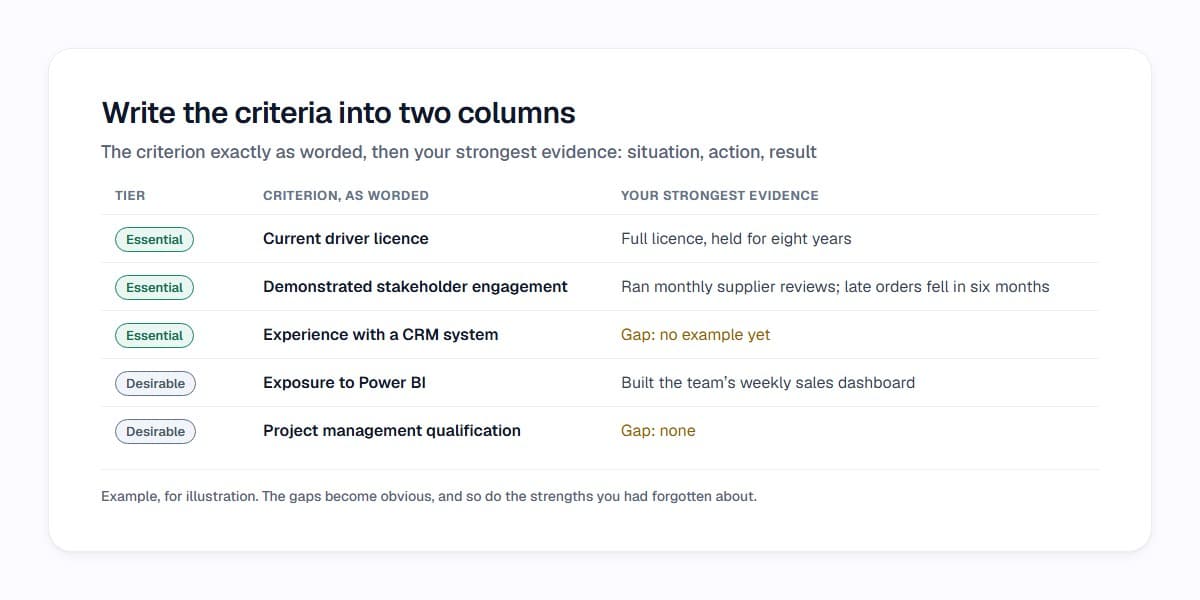
This is the normal situation, not the exception. Criteria lists are written as a description of an ideal, often assembled from an old position description plus whatever the last person in the role happened to be good at. Very few applicants arrive with every line covered.
What is worth doing is being precise rather than anxious. Write the criteria into a two-column list. In the left column, the criterion exactly as worded. In the right, your strongest piece of evidence: the situation, the action, the result. The gaps become obvious and so do the strengths you had forgotten about. If the role asks for written responses, that document is already most of your draft.
Pay attention to word limits and instructions too, because public sector applications often specify them and the specified format is part of what is being assessed. If an ad asks for a pitch of a stated length addressing the criteria together, that is the brief.
And keep the desirable list in proportion. It is designed to differentiate, which means it is normal for a field of applicants to cover it unevenly. Treating every desirable line as a barrier makes the ad harder than the employer wrote it.
A faster way to read criteria across SEEK and LinkedIn
Most of the fatigue in an Australian job search comes from reading the same twelve-bullet list in forty slightly different forms and trying to hold the comparisons in your head. The criteria are there to make shortlisting efficient for the employer. There is no reason you cannot make reading them efficient for you.
Orry sits in your browser while you use SEEK and LinkedIn Jobs the way you already do. Each role in your results picks up a score out of 100 against your own priorities, with the reasons shown, so the ads worth reading line by line stand out from the ones you have already seen three times this week.
Try Orry free and see what your next page of search results looks like when every ad's requirements are checked against your evidence before you open it.
See which jobs fit you before you open them.
Orry scores the jobs you browse on SEEK and LinkedIn Jobs against what matters to you, with the reasons.
Free to install · No credit card · Works on the sites you already use
Sources
- Responding to selection criteria – JobAccess
- Essential criteria in position descriptions – Scope Australia
- Addressing selection criteria – I Work For SA
- Responding to selection criteria – Jobs and Skills WA
- Addressing selection criteria – The University of Sydney
- Understanding Australian job advertisements – Live in Melbourne
- How to Address Selection Criteria (STAR Method)
Researched with AI assistance and checked by a person before publishing: editorial policy.